Wuaci Business

Run operations with clarity.

Connect sales, stock and purchasing. See what sold, what remains, and the gross profit behind each sale. Run lodging in its own workspace.

  • Retail and wholesale pricing
  • Bottles, packs and cartons
  • Cost allocation and gross profit
Wuaci BusinessRetail · sample data
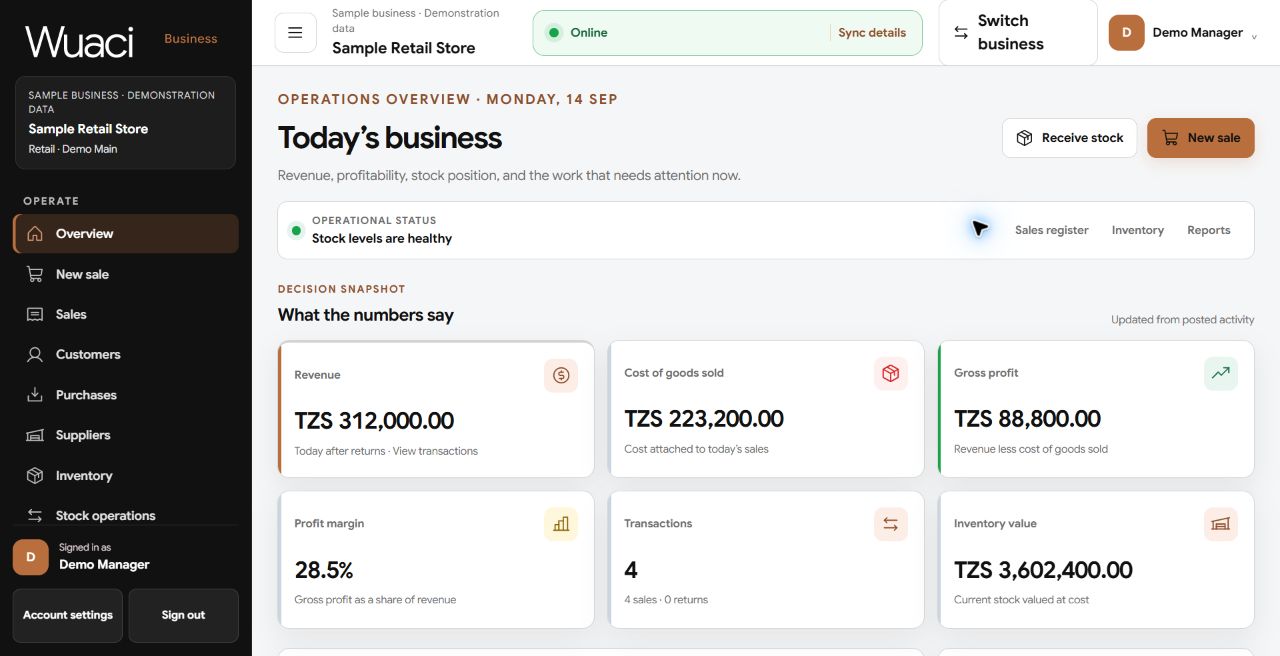
Actual retail overview with demonstration revenue, cost of goods sold, gross profit, transactions and inventory value.
The actual retail overview, populated with clearly labelled sample transactions. Figures illustrate the interface, not customer results. Open for a closer look.

See the real workspace

Retail, wholesale and lodging.

Current application screens with synthetic demonstration data. Open an example to explore the details.
Wholesale · carton sales and cost allocations

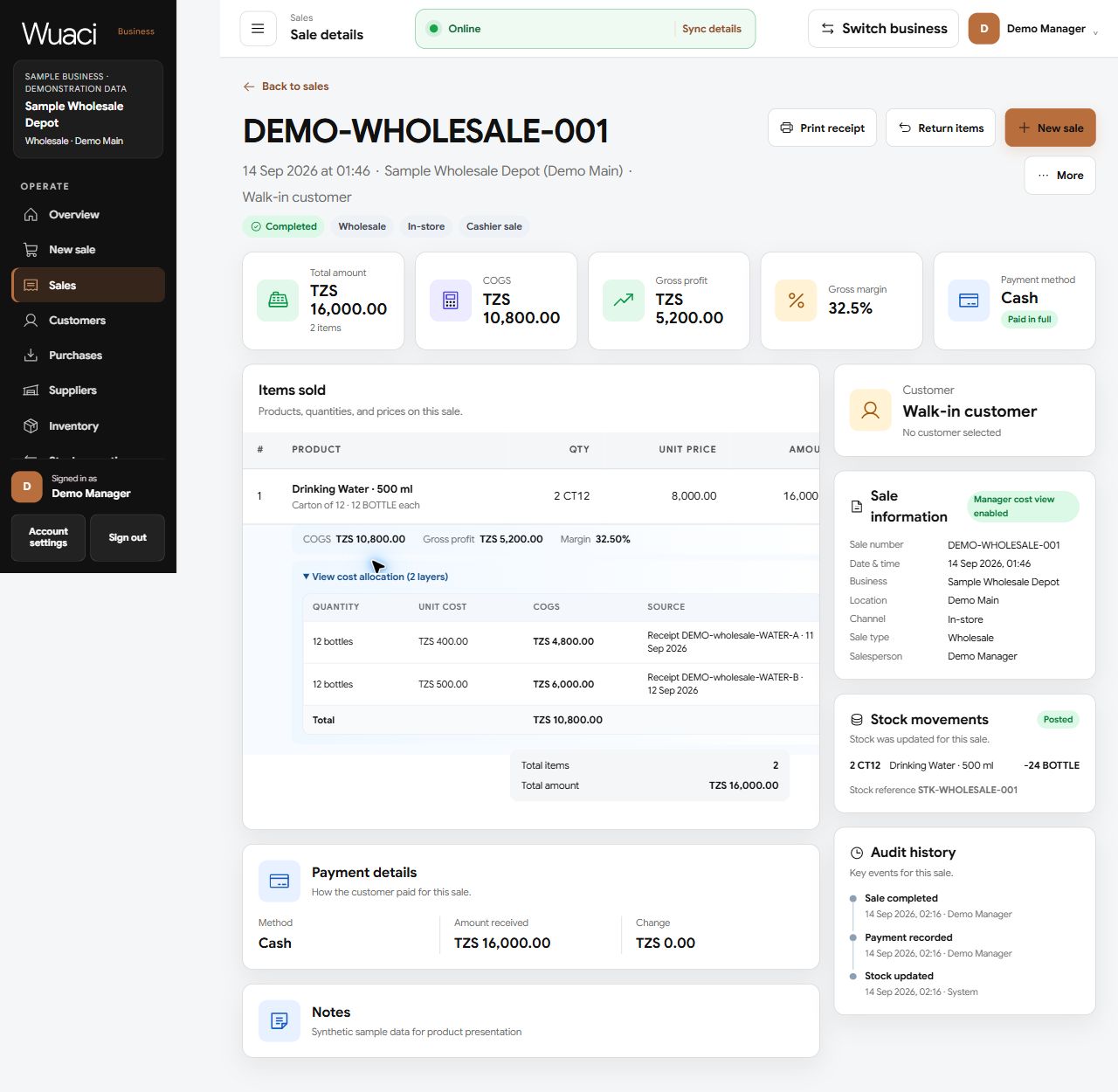
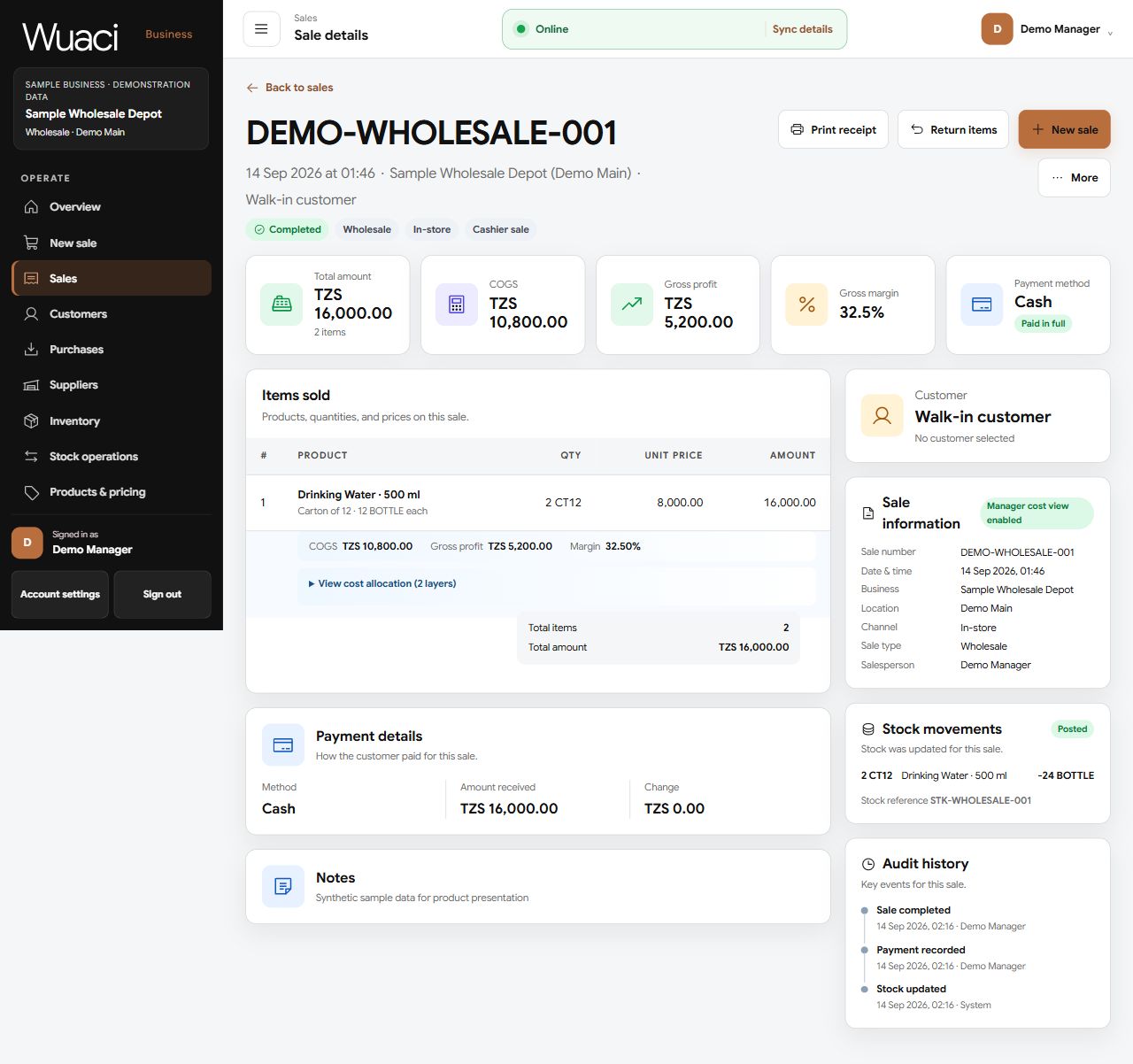
Two cartons contain 24 bottles. The cost allocation shows 12 bottles from each of two receipts, with the margin calculated from those recorded costs.

Actual wholesale sale detail, including two cartons sold and expanded cost allocation from two sample stock receipts.
Lodging · occupied, reserved and available rooms

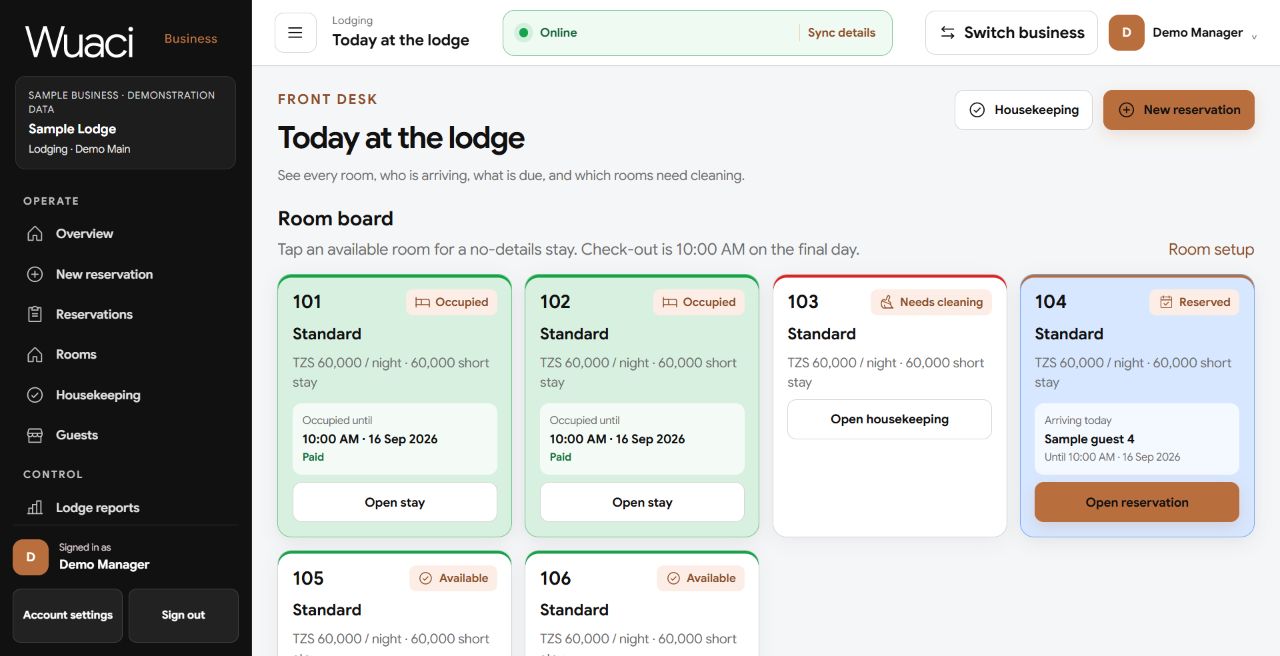
The room board brings availability, arrivals, payments and cleaning status into one view. Guest names and amounts in this example are demonstration data.

Actual lodge room board with sample occupied rooms, a room needing cleaning, an arrival and available rooms.

Built for your team

One sale. The right view for each role.

The same sample transaction, opened with the standard Manager and Salesperson role presets. Permissions can be configured for each workspace.
Salesperson · serve customers and review the sale

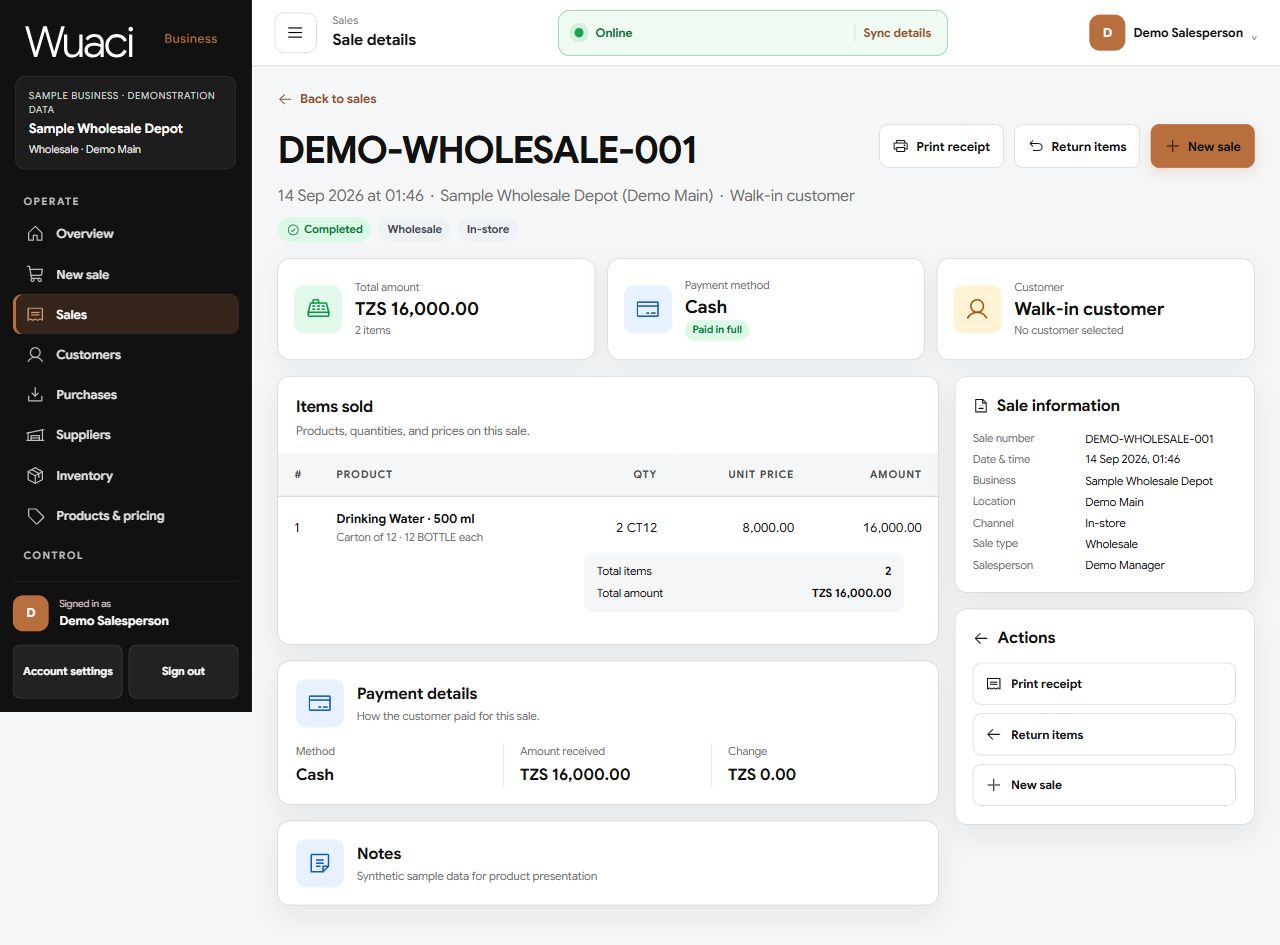
Items, quantities, payment details, receipts and returns, without COGS, gross profit or inventory cost allocations. Those cost details are excluded from this role’s sale page, not simply hidden on screen.

Salesperson view of sample sale DEMO-WHOLESALE-001, showing TZS 16,000 received, two cartons sold and payment details, without cost or profit information.
Manager · understand costs and profitability

The same TZS 16,000 sale adds TZS 10,800 in recorded costs, TZS 5,200 gross profit and a 32.5% margin. The manager can expand the two inventory cost allocations for supporting detail.

Manager view of the same demonstration sale, with COGS, gross profit, margin, expandable cost allocations, stock movements and audit history.

Actual application screens with synthetic sample data; no customer records or real business results are published.

Business stock summary shows 500 bottles as 83 cartons of six plus two bottles, or 41 cartons of twelve plus eight bottles, alongside stock actions.
Actual Business screen, captured in the review workspace with demonstration stock. These are alternative representations of one balance, not stock to add together. Open the image to inspect it at full size.
01

Sales and returns

Record sales, line items, payments, customers, and returns.

02

Packaging-aware stock

Track each product in its base unit, with packaging equivalents, counts and transfers.

03

Purchasing

Record purchases, suppliers, received stock, and supplier returns.

04

Lodging operations

Handle rooms, reservations, payments, guests, and housekeeping.

Built from implemented workflows

The records behind the overview.

Wuaci Business connects day-to-day entries with the operational views used to review them.
Sales

Understand the margin

Managers can review revenue, cost of goods sold, gross profit and the inventory cost allocations behind a sale. Cost information follows role permissions.

Stock

Counts, lots, and transfers

Review inventory by movement and location, record counts, and move stock with traceable transfer records.

Lodging

From reservation to checkout

Manage room availability, charges, payments, check-in, checkout, cancellations, and housekeeping tasks.

Control and continuity

Designed for accountable operations.

Team roles and permitted locations, set separately per workspace

Activity & audit trail with filtered export

Sales, COGS and gross-profit reports, not a full accounting statement

Sync status for supported work saved on a prepared device; sign-in and initial setup need a connection

Wuaci Business

Continue to your operations workspace.

Sign in with your Wuaci account, or create one to start a new organization. Invitations are only for joining an existing organization.
Continue to Business →